Documentation
Learn how to integrate with Magpai and automate your workflows.
How Magpai Works
Magpai connects three powerful components: Maggie (your AI assistant), The Brain (your knowledge base), and Workflows (your automations). They work together seamlessly.
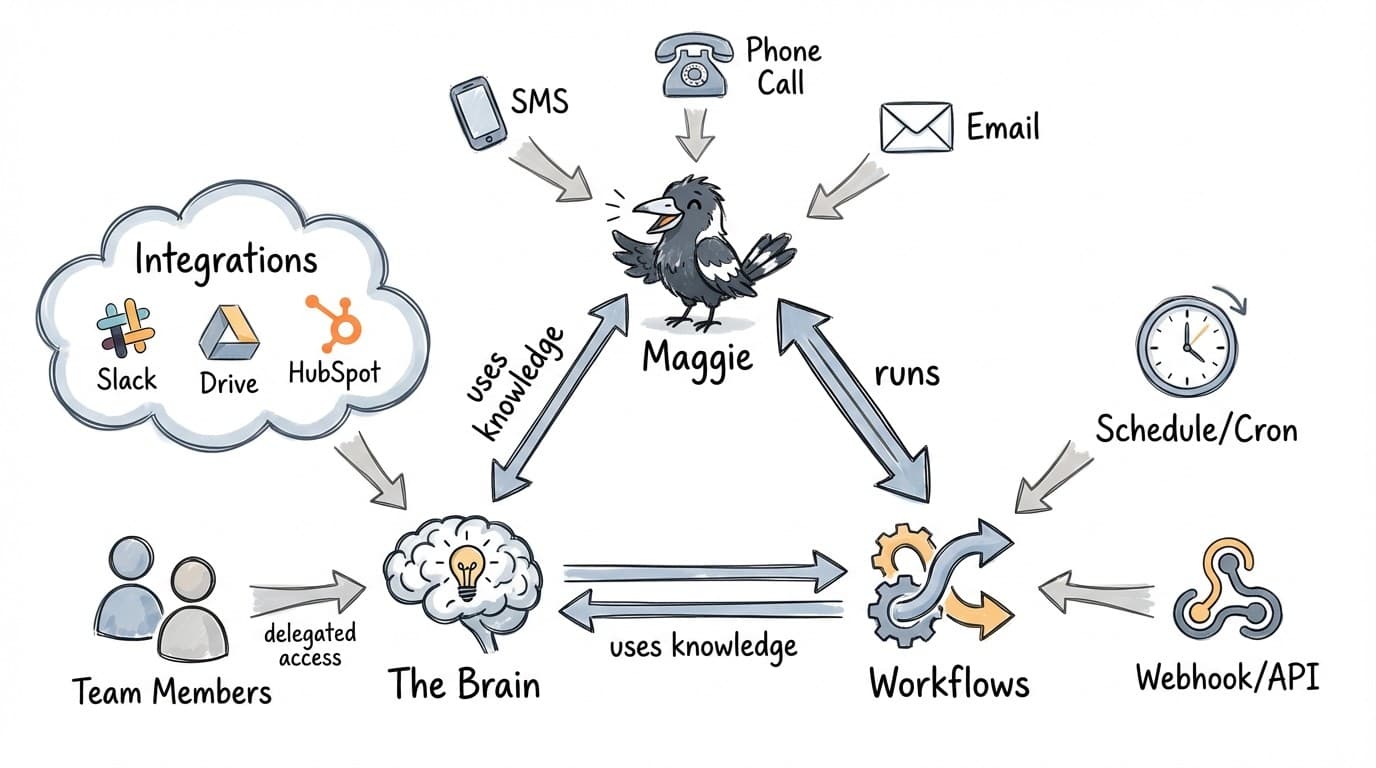
- Maggie ↔ Workflows: Maggie can trigger workflows, and workflows can run Maggie for AI-powered steps
- The Brain → Both: Both Maggie and Workflows draw on your team's knowledge stored in The Brain
- External Access: Reach Maggie via SMS, phone, or email. Trigger workflows via schedules or webhooks
- Integrations: The Brain connects to your tools (Slack, Drive, HubSpot) with delegated team access
Getting Started
Talking to Maggie
Learn how to chat with your AI assistant and what she can help you with.
The Brain
Organize your team's knowledge with folders, notes, and links.
Workflows
Automate tasks and let Maggie handle repetitive work for you.
Integrations
Connect your favorite tools and let Maggie work with them.
Quick Start
New to Magpai?
- Start by chatting with Maggie - ask her anything!
- Organize your knowledge in The Brain with folders, notes, and links
- Connect your favorite tools in Integrations
- Automate repetitive tasks with Workflows