Variants
AdvancedCreate multiple versions of a workflow with different context.
Overview
Variants allow you to create multiple versions of the same workflow, each with different context. Instead of duplicating workflows for different clients, projects, or scenarios, use variants to maintain a single workflow with contextual overrides.
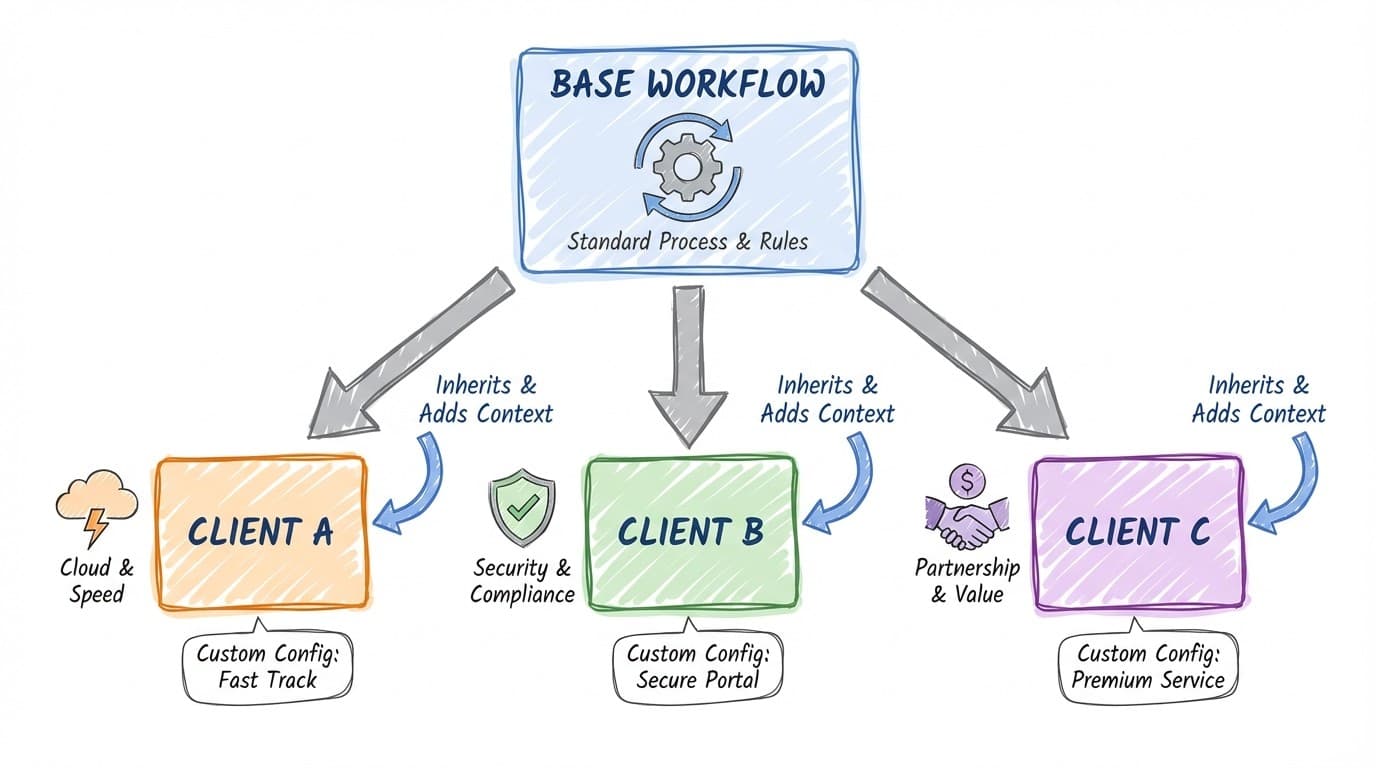
Use case: A "Client Report" workflow with variants for each client - same steps, different client-specific context injected into each run.
How Variants Work
Each variant has its own context that gets injected when the workflow runs:
- User selects a variant when running the workflow (or specifies via API)
- The variant's context is loaded alongside the base workflow prompt
- All steps execute with this combined context
- The run is associated with the selected variant
Variant Structure
{
  "id": "variant-acme-corp",
  "name": "ACME Corporation",
  "context": "<p>Client: ACME Corporation</p>
<p>Industry: Manufacturing</p>
<p>Key contacts: John (CEO), Sarah (CTO)</p>
<p>Tone: Professional, technical audience</p>",
  "createdAt": "2024-01-10T09:00:00Z",
  "updatedAt": "2024-01-15T14:30:00Z"
}| Property | Type | Description |
|---|---|---|
| id | string | Unique identifier |
| name | string | Display name for the variant |
| context | string (HTML) | Rich text context for this variant |
| createdAt | string (ISO) | Creation timestamp |
| updatedAt | string (ISO) | Last update timestamp |
Workflow Configuration
Configure variants at the workflow level:
{
  "name": "Client Monthly Report",
  "prompt": "Generate a monthly performance report...",
  "requireVariantSelection": true,
  "variants": {
    "variant-acme-corp": {
      "id": "variant-acme-corp",
      "name": "ACME Corporation",
      "context": "..."
    },
    "variant-globex": {
      "id": "variant-globex",
      "name": "Globex Inc",
      "context": "..."
    }
  }
}
requireVariantSelection: When true, users must select a variant before running. When false, the workflow can run without a variant (using only the base prompt).
Common Use Cases
Multi-Client Workflows
Same reporting workflow with client-specific context, preferences, and terminology.
Regional Variations
Same process adapted for different regions, languages, or regulations.
Project Templates
Same project workflow with different project-specific context loaded.
Department Customization
Same workflow adapted for Sales vs Marketing vs Support contexts.
Using Variants via API
Specify a variant when triggering workflows via the Webhook API:
Get available variants
GET /api/workflow/{workflowId}/schema

Response includes:
{
  "variants": [
    { "id": "variant-acme-corp", "name": "ACME Corporation" },
    { "id": "variant-globex", "name": "Globex Inc" }
  ]
}
Run with a specific variant
POST /api/workflow/{workflowId}/run

{
  "variantId": "variant-acme-corp",
  "inputs": {
    "month": "January 2024"
  }
}
See Webhook API for full API documentation.
Managing Variants
- Open your workflow in the editor
- Navigate to the Variants section
- Click "Add Variant" to create a new variant
- Enter a name and context for the variant
- Use the rich text editor to format context as needed
- Save the workflow
Writing Effective Variant Context
- Include relevant background information (who, what, why)
- Add key terminology or naming conventions
- Specify tone and communication preferences
- List important contacts or stakeholders
- Note any special requirements or constraints
- Keep context concise but complete
Tracking Variant Runs
Each workflow run tracks which variant was used:
// Workflow run
{
  "id": "run-123",
  "workflowId": "workflow-abc",
  "variantId": "variant-acme-corp",
  "status": "finished",
  // ...
}
Filter run history by variant to see all runs for a specific client or context.
Best Practices
- Use variants instead of duplicating workflows
- Keep the base workflow generic; put specifics in variant context
- Enable
requireVariantSelectionwhen variants are mandatory - Name variants clearly (client names, project codes, etc.)
- Review and update variant context regularly
- Use rich text formatting for readable context
Related
- Building Workflows - Workflow design patterns
- Webhook API - Triggering variants programmatically
- Prompt Steps - How context affects AI behavior